Running Production Swarm: Serving Containerized Apps Without Kubernetes
Heads up: the diagrams in this post are interactive. Break things, drag sliders, click nodes. They are simplified models of the real cluster, not live data.
Why this post exists
Containers have become the default way to ship software. A container carries its dependencies with it, so the app that worked on a laptop behaves the same in production, and the "it works on my machine" argument mostly goes away. If an app can be containerized, it can run the same way everywhere.
The journey to containers is only beginning for us. Most internally built systems are on virtual machines or bare servers, and the move to containers is gradual. This post documents how I designed our containerized deployment platform: the architecture, the reasons behind it, the incidents that shaped it, and the parts I know are imperfect.
The ladder: from one host to an orchestrator
There are several ways to run containers in production, and they sit on a ladder of capability and complexity.
| Option | What it is | Good at | Costs you |
|---|---|---|---|
| Docker on individual hosts | docker run or Compose on each server | Zero new concepts if you know Linux | You decide which host runs what. Every host needs credentials in CI/CD. No self-healing across machines. |
| Docker Swarm | Orchestration built into the Docker Engine | Clustering, rolling updates, rescheduling, overlay networking, with a tiny learning curve | No autoscaling, a small ecosystem, an uncertain long-term industry position |
| Kubernetes | The industry-standard orchestrator | Scheduling, autoscaling, huge ecosystem | Steep learning curve and real engineering capacity to run it well |
I started on the first rung. For a year or two, a handful of systems ran on standalone Docker hosts: web applications, internal tools, and the monitoring stack. That worked well. Several services shared one server, deployment was quick, and nobody had to learn anything exotic.
But standalone hosts behave like a single VM you can stack many containers on, and the questions pile up:
- Which machine serves which app, and where should the next container go?
- What happens to the apps on a host when that host dies at 2 a.m.?
- CI/CD becomes a problem, because it has to connect to every host to deploy, which means each pipeline needs credentials for every host it deploys to.
Those are orchestration questions. Kubernetes answers them, and it is where I want the team's skills to go. But it demands operational knowledge that our team does not have in depth yet. I have managed a few Kubernetes deployments before, and I wanted this to be a gradual transition so that the entire team could learn the fundamentals of containers and orchestration without being overwhelmed. Swarm answers the same questions with a few commands, using concepts a Linux admin already holds: nodes, services, networks, and volumes. Swarm is the entry point I can adopt without a steep learning curve, and Kubernetes remains the destination. Because everything is containerized, the move later is mostly a change of manifest format rather than a rewrite.
The architecture
Here is the whole cluster at a glance. A request enters through a floating IP, passes a load balancer, is routed by a reverse proxy, and arrives at a container on a worker node. Press Send a request to watch one request travel down the stack, or press Step to move it one hop at a time. The explanation under the diagram only changes when the packet moves to the next step, and you can click any box to jump straight to it. The dashed ring around the packet means it is still encrypted, and switching to plain HTTP shows where the redirect happens.
Step 1 of 6: Client
A browser opens a TLS connection to the virtual IP on port 443. The traffic is encrypted, and stays encrypted until it reaches Traefik.
- Clients only know a hostname. DNS and NAT in front of the cluster are outside Swarm.
Nothing moves until you press a button. Click any box to jump to that step.
A few design facts drive everything else:
- TLS is terminated by Traefik, not HAProxy. HAProxy passes port 443 through as raw TCP and prepends a PROXY protocol header so Traefik still sees the real client address.
- Traefik runs only on managers, one replica per manager, and publishes host-mode ports so HAProxy talks straight to the Traefik on the chosen node.
- Routing is label-driven. Nothing about an app's hostname is hard-coded in Traefik. A service becomes reachable by carrying labels.
- Swarm does not scale anything by itself. A separate in-house service that I built,
swarmctl, does that.
Now the same path, but with things going wrong. Break something, send a request, and step through it to see exactly where it stops. Try breaking HAProxy on the manager that holds the VIP and sending a request straight away, then send another once the election has finished. After that, stop all four tasks and compare where the request dies.
- Send a request to see its trace here, one line per hop.
0 succeeded · 0 failed
Nothing moves until you press a button. Changes apply to the next request you send. The keepalived election is shortened for the demo.
The edge: keepalived and HAProxy
One address that never moves (keepalived)
Clients and firewalls need one stable address. keepalived provides it using VRRP: every manager advertises, and the one with the highest priority holds a virtual IP (VIP). If that manager disappears, the others notice the missed advertisements and one of them takes over the address.
I also tie the priority to what actually matters, which is whether HAProxy is answering:
vrrp_script chk_haproxy {
    script   "curl -sf http://localhost:80"
    interval 2
    weight   -20        # failing check costs 20 priority points
}

vrrp_instance VI_1 {
    state             MASTER      # BACKUP on the others
    interface         eth0
    virtual_router_id 51
    priority          110         # 100 and 90 on the others
    advert_int        1
    virtual_ipaddress { 10.0.0.100/23 }
    track_script      { chk_haproxy }
}
If HAProxy stops responding on the master, it drops from 110 to 90, the node with 100 takes the VIP, and when HAProxy recovers the original master preempts back. Failover takes about three missed adverts plus up to two seconds for the check, so roughly five seconds. The animation above shortens it, but you can see requests time out during the hand-over.
Two lessons from running this:
- Priorities and weights interact. Think through what happens when two nodes fail, not just one. The tie-break between equal priorities is the higher IP address.
- VRRP is multicast by default. A manager on a different network (this cluster has one in OpenStack) may never hear its peers and will promote itself, producing two nodes holding the same VIP. The fix is unicast VRRP (
unicast_src_ip/unicast_peer), or keeping that node out of the VRRP group and using it only as an HAProxy backend. Verify withip -br aon every manager.
Spreading load (HAProxy)
Every manager runs HAProxy with an identical file. It does two jobs:
| Listener | Mode | Behavior |
|---|---|---|
:80 | http | Adds X-Forwarded-* headers, rate-limits per source IP with a stick table (HTTP 429 above 200 requests per 10 s), balances leastconn across the three Traefiks |
:443 | tcp | TLS passthrough to the same Traefiks with send-proxy so the client IP survives |
Health checks run every 5 s with rise 2 fall 3, so a dead Traefik is pulled out in about 15 s. During that window option redispatch and retries 3 retry on another backend, so most users never notice.
HAProxy and keepalived are both native services, not containers. That is on purpose: the thing that gives containers a front door should not depend on the orchestrator being healthy.
Traefik: routing without editing config
Traefik is the only containerized part of the edge. It watches the Swarm API, discovers services that opt in, and builds routes from their labels. Adding an app to production means adding labels to its stack file. Nobody edits a proxy config or reloads anything.
services:
  web:
    image: registry.example.com/team/web:1.4.2
    networks: [proxy-net]
    deploy:
      replicas: 3
      labels:
        - traefik.enable=true
        - traefik.http.routers.web.rule=Host(`app.example.com`)
        - traefik.http.routers.web.entrypoints=websecure
        - traefik.http.routers.web.tls=true
        - traefik.http.services.web.loadbalancer.server.port=8080

networks:
  proxy-net:
    external: true
    name: prod-proxy-net
Details that matter in production:
- Three replicas, one per manager, constrained to
node.role == manager, with ports published in host mode. That bypasses Swarm's built-in routing mesh, which is simple but hides the client IP and adds a hop. exposedByDefault: false. A service must settraefik.enable=true. No accidental exposure.- The provider refreshes every 15 s and on Docker events, so new services appear quickly and dead tasks drop out.
- Shared middlewares live in one dynamic file: HSTS and security headers, rate limiting, compression, an IP allow-list for admin tools, and basic auth for the dashboard.
- A catch-all router with priority 1 sends any unknown hostname to a maintenance page (explained just below).
- Logs and metrics go out through OpenTelemetry and Prometheus, so I can monitor incoming traffic. They are also the signal the autoscaler reads. Monitoring is very important to me, and the observability section below explains what we monitor on this cluster.
Why a catch-all maintenance page
Every hostname served by the cluster points at the same address. When a service fails to start or is unreachable, Traefik falls back to its default response, a plain "404 page not found" (or a "bad gateway"). That error is not user-friendly: imagine opening an address and seeing a black page with small text saying "404 page not found".
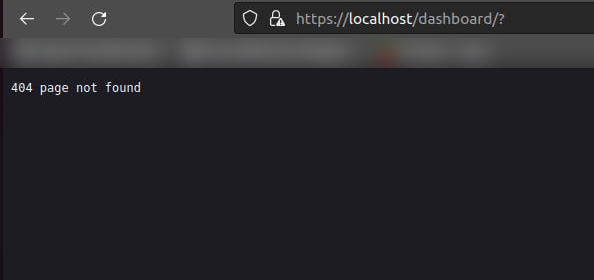
Traefik's default response when no router matches the request.
So I created a catch-all router that sends all unknown hostnames to a maintenance page. It is a small React app that reads the requested route, checks it against a YAML config, and decides what to show: either a nicely designed "not found" page or an "under maintenance" page. Every DNS record pointed at this cluster expects a service, so a request that matches nothing means the service has either failed to start or is unreachable, and a maintenance page is a better experience than a bare error.

The maintenance page that unknown or unreachable hostnames now land on.
One gotcha I hit: restart policies with
max_attempts: 3and nowindowmean a service that crashes three times gives up forever. After a network event, two of three Traefik replicas stopped restarting and one replica carried all traffic until someone randocker service update --force. For anything on the edge, set awindowormax_attempts: 0, and alert when running replicas are below desired.
Networks: one front door, private back rooms
Swarm overlay networks (VXLAN over UDP 4789, with gossip on 7946 and raft on 2377) let containers on different hosts talk as if they shared a switch. I use two kinds:
- One shared proxy network. Every web-facing container joins it, along with Traefik. About half of all services are on it.
- One private overlay per stack for databases, queues, and workers. Those containers are not attached to the proxy network, so Traefik can never reach them. Say you want to deploy a stack with a frontend, a backend, a worker (or consumer), Redis, and Postgres. Only the frontend and backend are reachable from Traefik, because those are the ones we expose to clients. The worker and the databases are internal only, and each stack defines its own internal network. An example stack file looks like this:
services:
  api:        # reachable from Traefik and from its own backend
    networks: [proxy-net, backend]
  worker:     # internal only
    networks: [backend]
  postgres:   # internal only
    networks: [backend]

networks:
  proxy-net: { external: true, name: prod-proxy-net }
  backend:   {}
That pattern gives you network isolation between stacks for free, without writing a single firewall rule.
Managers, workers, and quorum
A Swarm cluster has two kinds of nodes.
Managers hold the cluster's state in a Raft log and make the decisions: where a task lives, when to reschedule it, when a node has joined or left. Workers run the actual workloads. I keep application workloads on workers. Managers run only the pieces that make the cluster resilient or operable: Traefik, the autoscaler, and a few internal tools.
Raft needs a majority of managers to agree on anything. With three managers, you can lose one. Lose two and the cluster has no leader.
3/3 managers up, quorum is 2. Cluster is healthy and can lose 1 more.
Click a manager to take it down or bring it back. Press Play to see the leader's heartbeats as dots.
Things this taught me:
- Existing containers keep running when quorum is lost, but that does not always mean users can still reach them (more on that below). What you lose is the ability to deploy, scale, drain, or reschedule, which is exactly when you need it most.
- Never restart two managers at once. Confirm the other two are reachable first, and go one by one.
- Managers do little work, so adding more is about resilience, not capacity.
The first point is a bit tricky. Our research suggested that you can still serve traffic when quorum is lost. That is not the case for this cluster, because Traefik reads the cluster state from Swarm and builds its routes from it. When the managers lose quorum and enter a read-only state, Traefik cannot read the cluster state and cannot route traffic to the right service. So even though the containers are still running, they are not reachable from outside.
The workaround is to define routes statically in Traefik instead of reading them from Swarm. That way even one manager can serve traffic, because the routes live in Traefik's own configuration. But it is a trade-off: static routes have to be updated by hand whenever a new service is added, and new services are added every single day.
I am considering a hybrid approach: define static routes for the critical services and read the rest from Swarm, so that critical services stay reachable even when quorum is lost. Another option is to let the autoscaler edit the routes configuration every time a new service is added.
Two kinds of workers
- Hand-joined workers. A small number of nodes an admin joined manually with the CLI. Examples: a node that was originally meant for one app and now hosts team services, a dedicated data node, and a test VM.
- Autoscaling-group workers. Because we run our own private cloud, most workers come from autoscaling groups in OpenStack. The group creates and removes VMs based on load, and they join the cluster without anyone touching them. This is the big win of putting an orchestrator on top of an elastic cloud: capacity is just a number.
Because those VMs are disposable, I label them lifecycle=ephemeral and treat everything on them as stateless. That brings me to labels.
Labels and placement
Labels are the most useful feature in our cluster. A label is a key-value tag on a node, and a placement constraint on a service says "only run on nodes where this is true". Together they answer "where does this container go?" without anyone choosing a host.
| Label | Meaning |
|---|---|
lifecycle=ephemeral | Disposable cloud worker. Workloads must be stateless. |
pool=web | Sample pool for public-facing web apps |
pool=batch | Sample pool for background workers and builds |
role=test | Preview and test deployments |
deploy:
  placement:
    constraints:
      - node.role == worker
      - node.labels.pool == web
A task is scheduled only where all of a service's constraints are true. Experiment below. Select service A, then click nodes to relabel or drain them. Then hit "Replay the incident".
node.role == workernode.labels.pool == webservice A: 3 replicas over 3 eligible nodes.
Pick a service to see its constraints. Click a node to relabel or drain it and watch tasks re-place. 'Replay the incident' relabels two healthy nodes into the web pool and drains two stalled ones.
That replay is a real event. During a storage stall in October, the workers in one pool showed I/O pressure near 99% and tasks never got past Assigned. I did not touch a single stack file. I labeled four healthy nodes into the pool, drained the stalled ones, and the replicas of the affected services came up within minutes:
docker node update --label-add pool=web <healthy-node>
docker node update --availability drain <sick-node>
# ...and undo afterwards
docker node update --label-rm pool <healthy-node>
docker node update --availability active <node>
The stateful problem, honestly
Containers are ephemeral, but databases are not. Kubernetes has StatefulSets and a storage ecosystem for this. We do not have an equivalent, so our approach is deliberately blunt:
- One dedicated data node carries
node-type=data, and stateful services are constrained to it. - The data disk is a Ceph volume mounted on that VM under a fixed path, so the data does not live on the VM itself. It is also backed up frequently.
- Services reach the database by a DNS name, never by an IP address.
- Some databases live outside Swarm entirely, on conventional servers.
This works, but it is a single point of failure. In one outage, that node was down for days. Everything pinned to it stayed Pending, and everything that depended on it (SSO, docs, dashboards) returned 5xx errors.
The Ceph disk and the DNS name are what turn that outage into a recovery procedure instead of a rebuild. If the data node fails, we can recover like this:
- Make sure the failed VM can no longer write to the disk (power it off, or blocklist it in Ceph).
- Attach the same Ceph volume to a healthy VM and mount it at the same path.
- Give that VM the
node-type=datalabel, so the pinned services are scheduled onto it. - Repoint the DNS name at the new VM.
Does it work? Yes, with two caveats. First, a Ceph block device is meant to be written by one machine at a time, so step 1 is not optional. If two VMs mount the same disk, the filesystem gets corrupted. Second, it is a manual failover, so recovery time is detection plus those four steps plus DNS caching (keep the TTL low). It turns days into minutes, but it is not instant. If I could fix one thing next, it would be to automate those steps and add an alert on Pending tasks.
Autoscaling: Swarm has none, so I built a controller
Swarm will keep N replicas alive. It will never decide that N should be 8 because a busy season is starting. To scale, you run docker service scale by hand.
I built swarmctl (the full write-up is here), a single in-house service that runs on a manager. Services opt in with labels:
deploy:
  replicas: 3
  labels:
    - swarmctl.enable=true
    - swarmctl.min_replicas=3
    - swarmctl.max_replicas=10
    - swarmctl.scale_up_cpu_avg=70
    - swarmctl.cooldown_after_up=300
    - swarmctl.simulation_enabled=true   # check survivors before scaling down
It collects container metrics from cAdvisor (a global service: one instance on every node) and request metrics from Traefik, then adjusts replicas between the min and max. It also has a dashboard where admins can see replicas and scaling events.
The control loop is simple, but the details are where autoscalers go wrong. Throw a spike at this simulation and watch what the lag does:
CPU 67% · 3/3 tasks ready · cooldown none. Steady state.
It starts paused. Hit a preset or drag the slider to start it, or press Play. New tasks need a few seconds to start, so CPU stays high for a moment after a spike, and cooldowns stop the controller from flapping.
Four things worth noticing:
- New tasks are not instant. The pulsing, paler ones are still starting. CPU stays high until they are ready, and a naive controller would panic and add more.
- Cooldowns exist to prevent flapping. Without them, the controller scales up, sees a temporary dip, scales down, and repeats.
- Scaling in is slower than scaling out on purpose. Being short of capacity is worse than having extra.
min_replicasis enforced. If you manually scale a managed service below its minimum,swarmctlputs it back. Change the label first.
Scale-down is guarded by a removal simulation (simulation_enabled, on by default). Before taking a replica away, swarmctl projects what the survivors would look like and refuses if they would end up too hot. That is what stops the classic loop of scaling down, overloading what is left, and immediately scaling back up.
If you want the full story (the collector, the decision engine and its simulation guards, the executor, and how it asks OpenStack for new VMs and drains nodes before removing them), I wrote it up separately:

Is this a replacement for the Kubernetes HPA? No. It is predictive only in a basic way, but it is good enough for this load profile, which follows a predictable seasonal pattern. If demand grows beyond what a hand-built controller should handle, that is a good reason to move.
State, secrets, and the registry
- Images come from a private registry. If a node cannot pull from it, tasks sit in
AssignedorRejected: No such image. - TLS material is kept as Docker secrets; ACME data lives in a volume on whichever manager holds it.
- Configs (Traefik's static and dynamic files) are versioned Swarm configs. A warning: configs are immutable, so every change creates a new name, and without discipline you end up with
traefik_dynamic,_v2,_v4, and a few typos. Clean up unused versions, and only trust whatdocker service inspectsays is mounted. - Secrets are not environment variables. Our inventory tooling deliberately never reads service environment variables.
Observability: you cannot run what you cannot see
| Piece | Purpose |
|---|---|
| Traefik metrics (Prometheus) | Request rate, latency, errors by router and service |
| Traefik access logs via OpenTelemetry | Central log pipeline |
| cAdvisor (global service) | Per-container CPU and memory, also fuel for the autoscaler |
| HAProxy stats + Prometheus exporter | Edge health. Keep the stats UI off public interfaces and use hashed credentials. |
| Grafana, Loki, Alloy | Dashboards and logs |
| Gatus | Uptime checks from outside, so you learn about failures before users tell you |
I wrote up how this monitoring stack was built as a four-part series, from Prometheus and Grafana to Alloy, Loki and Tempo. Start with Part 1:
The rest of the series: Part 2, Grafana Alloy and the push versus pull problem, Part 3, Loki, Tempo and the full observability picture, and Part 4, the Enrollment API.
What the dashboards look like
Everything above ends up in Grafana. Here are two of the dashboards.
HAProxy: edge health. Servers up and down, backend status, queue depth, 4xx and 5xx rates, and connection and session rates. If the edge is unhealthy, this is where it shows first.
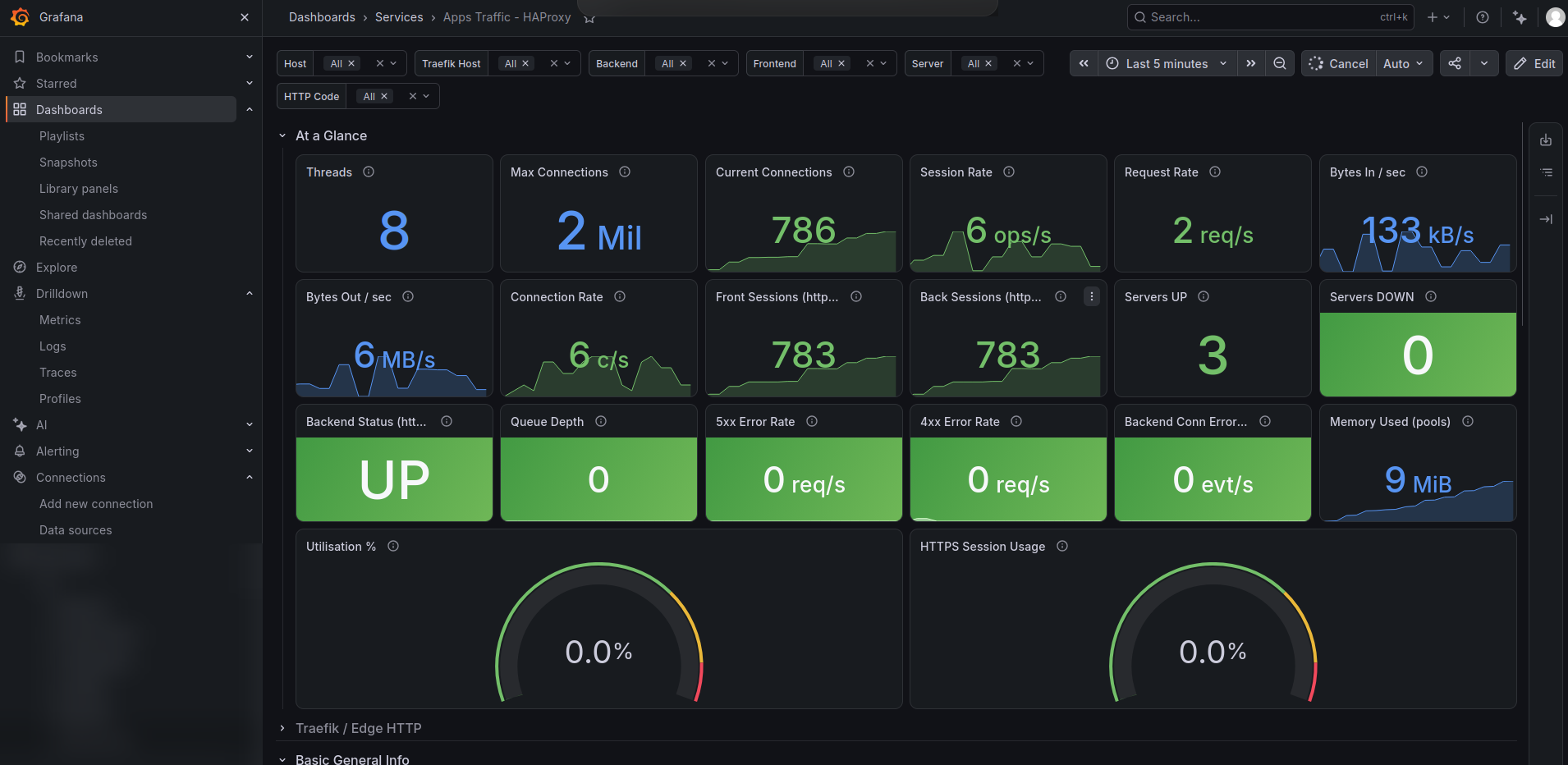
The HAProxy dashboard: three servers up, none down, an empty queue, and no 4xx or 5xx errors.
Traefik: traffic over time. Total requests, the success percentage, request volume, and a breakdown of HTTP status codes over the last 12 hours. It is useful for spotting a sudden rise in 4xx or 5xx responses.
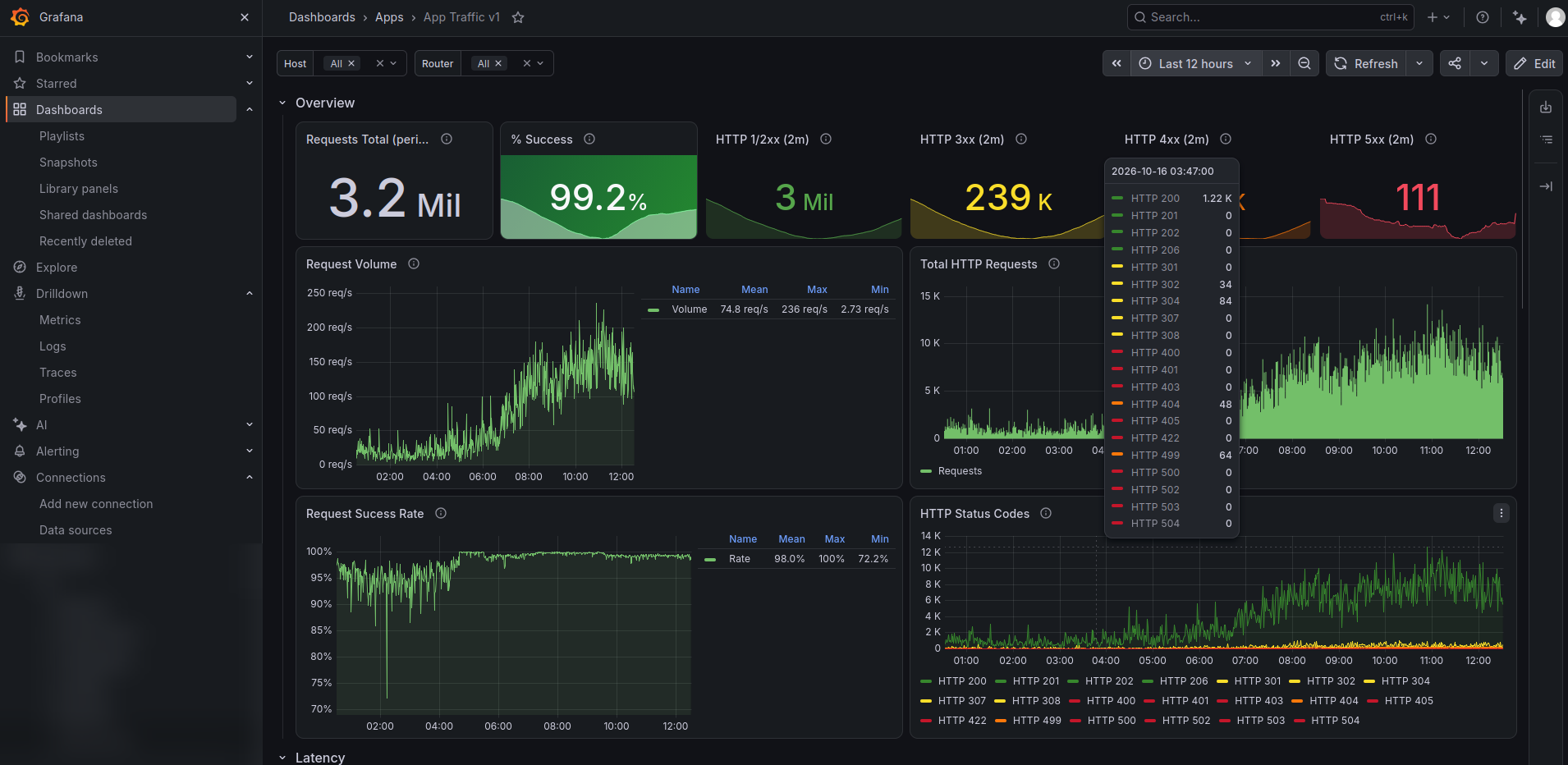
The Traefik traffic dashboard over the last 12 hours.
The metric I wish I had alerted on from day one is simple: running replicas below desired replicas. Almost every incident I have had would have paged me within a minute.
What a deployment looks like now
Compare this with the standalone-host days:
# the CI/CD agent runs on one manager and deploys straight from there
docker stack deploy --with-registry-auth -c stack.yml myapp
- No credential in the pipeline at all. The CI/CD agent runs on one of the managers, so it talks to the local Docker socket and deploys from there. Nothing needs to be stored in the pipeline or sent over the network.
- Swarm picks the nodes based on constraints.
- Rolling updates are built in:
deploy:
  update_config:
    parallelism: 1
    delay: 30s
    order: stop-first
    failure_action: rollback
- Test deployments land on the
role=testnode by constraint, so previews never compete with production.
What I would improve
I would rather publish this list than pretend it is empty:
- Unicast VRRP for the manager in a different network, to remove the duplicate-VIP risk.
- Fix restart policies on edge services and alert on replica deficits.
- Faster data node recovery. The data disk is on Ceph, so a failed node means remounting that disk elsewhere and repointing the DNS name. The remaining problem is how fast that can be done, so I want to script it and alert on
Pendingtasks. - Move the edge and internal tools off the managers. Traefik and tools like
swarmctlcould move to a separate pool of nodes, so that the managers are used only for cluster state and not for running workloads.
Why Swarm was the right call
Looking back, these are the reasons I chose it:
- The learning curve fit the team. An admin who understands Linux, Docker, and networks can be productive in days.
- It solved the real problems: placement, self-healing, rolling updates, one deployment endpoint, and overlay networking.
- The gaps were small enough to patch. Autoscaling and state are the two big ones, and a small controller plus a labeled data node covered both.
- It keeps the Kubernetes door open. The workloads are containers behind labels and health checks. When capacity and demand justify it, there is a deliberate path forward, and the team will arrive with the container fundamentals already solid.
If you are where I was, running containers on a few hosts with deployment credentials scattered everywhere, Swarm is a very reasonable next rung. Do not wait for the perfect platform. Get the fundamentals right (an edge you can fail over, routing from labels, placement from node labels, and alerts on replica deficits), and you will learn what you actually need from the next platform.
Appendix: a runbook that earned its place
# Who holds the VIP?
for h in <mgr-a> <mgr-b> <mgr-c>; do ssh $h 'hostname; ip -br a | grep <vip>'; done

# Services below desired replicas
docker service ls --format '{{.Name}} {{.Replicas}}' \
  | awk '{split($2,a,"/"); if(a[1]!=a[2]) print}'

# Why is it not running?
docker service ps <svc> --no-trunc

# Gossip trouble (run on each manager)
journalctl -u docker --since "5 min ago" | grep -c -E 'unknown to memberlist|rejoinClusterBootstrap'

# Reset a service that gave up
docker service update --force <svc>

# Is a worker disk-stalled? (I/O pressure near 99, many D-state processes)
ssh <node> 'cat /proc/pressure/io; ps -eo stat | grep -c ^D'

# Restart a manager's daemon: confirm the other two are Reachable first, one at a time
docker node ls --format '{{.Hostname}} {{.ManagerStatus}}'
sudo systemctl restart docker